Output Formats
1. Introduction
YJ Schema Validator supports multiple output formats to accommodate different use cases and integration scenarios. This guide details each available format and provides usage examples.
2. Available Formats
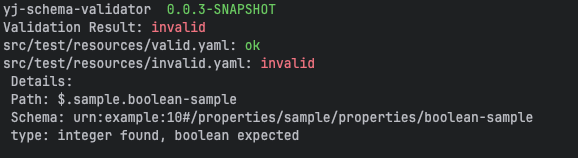
2.2. JSON Output
Structured JSON format is ideal for programmatic processing: json format is based on json schema draft standard Output Formatting
{
  "valid" : false,
  "files" : {
    "src/test/resources/valid.yaml" : {
      "valid" : true
    },
    "src/test/resources/invalid.yaml" : {
      "valid" : false,
      "details" : [ {
        "valid" : false,
        "evaluationPath" : "/properties/sample/properties/boolean-sample",
        "schemaLocation" : "urn:example:10#/properties/sample/properties/boolean-sample",
        "instanceLocation" : "/sample/boolean-sample",
        "errors" : {
          "type" : "integer found, boolean expected"
        }
      } ]
    }
  }
}
2.3. YAML Output
YAML format for better human readability:
---
valid: false
files:
  src/test/resources/valid.yaml:
    valid: true
  src/test/resources/invalid.yaml:
    valid: false
    details:
      - valid: false
      evaluationPath: "/properties/sample/properties/boolean-sample"
        schemaLocation: "urn:example:10#/properties/sample/properties/boolean-sample"
      instanceLocation: "/sample/boolean-sample"
        errors:
          type: "integer found, boolean expected"
2.4. JUnit XML Output (Alpha)
JUnit XML format for CI/CD integration:
<testsuites name="SchemaValidationSuite" tests="2" failures="1" errors="0" skipped="0">
    <testsuite name="SchemaValidationSuite" file="src/test/resources" time="0.0" tests="2" failures="1" errors="0" skipped="0">
        <testcase>
            <testcase classname="files" name="src/test/resources/valid.yaml" time="0.0">
                <failure/>
            </testcase>
            <testcase classname="files" name="src/test/resources/invalid.yaml" time="0.0">
                <failure message="Type Mismatch at /sample/boolean-sample">integer found, boolean expected</failure>
            </testcase>
        </testcase>
    </testsuite>
</testsuites>
2.5. SARIF Output
SARIF 2.1.0, for upload to the GitHub Security tab via github/codeql-action/upload-sarif
or any other code-scanning consumer. The tool.driver.version reports the running
validator’s build version.
{
  "$schema" : "https://json.schemastore.org/sarif-2.1.0.json",
  "runs" : [ {
    "invocations" : [ {
      "endTimeUtc" : "2026-01-01T00:00:01Z",
      "executionSuccessful" : false,
      "exitCode" : 1,
      "startTimeUtc" : "2026-01-01T00:00:00Z"
    } ],
    "results" : [ {
      "level" : "error",
      "locations" : [ {
        "physicalLocation" : {
          "artifactLocation" : {
            "uri" : "src/test/resources/testdata/invalid.yaml"
          },
          "region" : {
            "snippet" : {
              "text" : "Path: /sample/boolean-sample"
            }
          }
        }
      } ],
      "message" : {
        "text" : "At path '/sample/boolean-sample': integer found, boolean expected"
      },
      "ruleId" : "schema-validation"
    } ],
    "tool" : {
      "driver" : {
        "informationUri" : "https://github.com/alexmond/yj-schema-validator",
        "name" : "YAML Schema Validator",
        "rules" : [ {
          "defaultConfiguration" : {
            "level" : "error"
          },
          "fullDescription" : {
            "text" : "The file does not conform to the specified JSON/YAML schema"
          },
          "help" : {
            "text" : "Ensure that the file content matches the schema definition"
          },
          "id" : "schema-validation",
          "shortDescription" : {
            "text" : "Schema validation error"
          }
        } ],
        "semanticVersion" : "3.1.0",
        "version" : "3.1.0"
      }
    }
  } ],
  "version" : "2.1.0"
}
2.6. LLM Output
A compact report shaped for agents and LLM consumption. By default it emits JSON with a summary block plus one entry per file:
{
  "summary" : {
    "files" : 1,
    "valid" : 0,
    "invalid" : 1,
    "errors" : 1
  },
  "results" : [ {
    "file" : "src/test/resources/testdata/invalid.yaml",
    "valid" : false,
    "errors" : [ {
      "pointer" : "/sample/boolean-sample",
      "keyword" : "type",
      "message" : "integer found, boolean expected",
      "schemaLocation" : "urn:example:10#/properties/sample/properties/boolean-sample"
    } ]
  } ]
}
With --compact=true it instead emits compiler-style diagnostic lines, one per error,
preceded by a summary comment:
# 0/1 files valid, 1 errors
config/app.yaml: [type] /sample/boolean-sample: integer found, boolean expected
3. Configuration
| Option | Description | Example |
|---|---|---|
|
Output format selection ( |
|
|
For |
|
|
File to write output (defaults to stdout) |
|
|
Enable/disable a colored output (text format only) |
|